Changelog
- Resolved an issue where received carriage returns (0x0D) were not processed as a newlines even when the Newline Behavior had CR specified.
- Users can now specify the minimum window buffer size in the Tools->Options dialog rather than having to specify the value in the XML session file.
- It is now possible to specify a hostname for Telnet connections.
- Added menu shortcuts.
- Resolved a deadlock issue that could occur when a users is entering text while a macro is sending a lot of text using a COM port. This deadlock issue does not occur with Telnet sessions.
- Resolved an issue where copying connection window text to the clipboard would result in an uncaught exception when there is no text selected.
- Fixed an issue where pausing a macro and then reconnecting a connection would start the macro again, but the option to stop or pause the macro would be grayed out.
- Resolved a carriage return processing issue that could result in output not being displayed properly. The scenerio occurred when the first three characters of incoming text are \r\n\r. When this occurred, the prior line of text would disappear.
- Added carriage return (CR) as a newline option to both telnet and COM port connnections.
- Copying terminal text to the clipboard will now copy Rich Text Format data rather than plain text.
- Resolved an issue where specifying ctrlKeys="true" as a FoxTerm XML attribute was not taking effect correctly.
- Fixed an issue with dual monitor systems where FoxTerm dialog windows would always pop up on the left monitor, even if FoxTerm was located on the right monitor.
- CTRL-C and CTRL-V control characters are not passed down to the remote host (and instead are used for copy and paste) unless ctrlKeys="true" is specified as a FoxTerm XML attribute.
- Fixed a potential issue where a macro callback was calling the GUI thread improperly.
- Session internal buffers are flushed every 5s to prevent rare scenarios where data could be trapped in internal buffers and not flushed to the session window.
- Triggers will now work in binary format mode.
- Fixed an issue where, if using daily logs with pre and post fix time formats, the "Open Log" right click menu option would throw an error.
- Added the SendLineEx, WaitChar, and SendHex macro functions. See startup.ftm (included in download) for usage.
- Resolved several macro-related deadlock scenarios that could lead to FoxTerm's GUI hanging.
- Fixed an issue where two forward slashes in a SendLine string would result in syntax error. For instance, SendLine("ftp://something") will now work correctly.
- Fixed a potential crash that could occur when using the Broadcast Macro Dialog.
- If FoxTerm's window tiling is set to vertical and then FoxTerm is restarted, the first resize event would flip the tiling back to horizontal. This issue is now resolved.
- Added the GlobalSleep() macro function. GlobalSleep() will force each macro statement to sleep for N milliseconds. Setting to a value of 0 clears GlobalSleep(). See loop.ftm for example usage.
- FoxTerm now allows the keys F1-F12, CTRL-C, and CTRL-V to pass through to the target.
- The broadcast dialogs are now non-modal which means you can leave them up and continue to work on FoxTerm without being forced to close them first.
- Added XML support for minimum screen buffer size (MinBufferSize) and the ability to log timestamps to log file only (TimestampInLogOnly). See sample_session.xml for usage details.
- When a trigger is active, it is now displayed in the connection window title.
- Fixed some potential data syncronization issues that could possibly cause the FoxTerm input buffer to lose track of where it is in regards to handling the receive buffer resulting in delayed display output.
- Added a open log menu option so the log file can be easily opened from the connection right click menu.
- Fixed an issue where minimizing and then restoring the FoxTerm window would incorrectly invalidate the session, requiring a save.
- Minor ANSI escape sequence improvements.
- Added the macro commands BackgroundColor() and Reconnect(). See startup.ftm for syntax.
- Fixed an issue where going from borderless connection windows to windows with borders would size the windows incorrectly.
- Fixed an issue where FoxTerm would stack dump when a trigger attemped to launch a FoxTerm macro that printed an error. Examples of errors include macro syntax errors or if the macro could not be found.
- Added a Broadcast dialog to broadcast trigger settings to one or more open connections. This feature saves time in setting up triggers.
- Resolved an issue where binary format output would hang.
- After clicking on the connection properties menu item the output would hang for 100 characters. This issue is resolved.
- Resolved an issue where certain language packs such as Turkish would use very large initial font size.
- Minor bug fixes.
- Greatly improved FoxTerm GUI responsiveness when multiple connections are printing frequent data by improving how FoxTerm is internally multithreaded.
- Added the ability for FoxTerm to trigger on a user specified sequence of characters and then take a specified action. It is possible to specify the execution of either a FoxTerm macro or an external batch or executable file as the action. The trigger setup is located in the macro section of the connection right click menu.
- Changed the RecFlushInterval default value to from 20ms to 30ms. This improves GUI responsiveness when several connections are printing rapidly.
- It is now possible to turn off automatic window resizing by selecting "Window->Disable Auto Resize".
- Moved window size, location, maximize state, opacity, and border state from the dat file to the session xml file. That way if multiple FoxTerm sessions are being used, they will each load their own settings upon startup rather than share global settings.
- Fixed an issue where if FoxTerm was maximized on the right monitor in a dual monitor setup, it would maximize to the left monitor the next rather than the right upon startup.
- Fixed an issue where \r\r\n was resulting in an erased line rather than a newline. This case will now be treated exactly the same as \r\n.
- Added a new feature to collect stack traces for debug purposes. The feature is off by default, but can be enabled in Tools->Options->Stack Trace Logging. If a stack trace is captured, it will be saved to StackTrace.log in the same directory as FoxTerm.exe. Stack traces are captured when error handling occurs, such as when a connection cannot be made, when a macro fails, etc.
- Fixed a bug where connecting after a disconnect would not invoke the specified startup macro.
- Added the CloseApplication() macro command. Allows FoxTerm to be closed from a connection macro.
- It is now possible to start FoxTerm from the command line while specifying a session file. Example: C:\>FoxTerm.exe "C:\mysession.xml"
- Addressed an issue where an error in font setup could preclude a connection from being made. Observed when regional language is set to French. Message displayed is typically "Le format de la chaine d'entree est incorrect", or "Input format is incorrect" in English.
- Added better error messages for systems that do not have .Net 3.5 installed.
- Added the ability for the user to set FoxTerm's transparency level. The option is under Tools->Options.
- Moved the advanced features to the Tools menu item.
- Fixed a bug where SendLine() calls from FoxTerm macros would not echo to the screen even if echo was enabled.
- Fixed an issue where FoxTerm would appear to hang and not execute the startup macro when connecting to a raw TCP connection. If the negotiated options expected from a Telnet connection do not occur, FoxTerm will fallback to Raw Mode after 3 seconds. In raw mode the Telnet IAC character will not be processed. When using raw mode, it is likely the target device will be expecting CRLF rather than Telnet newline behavior so that setting may need to be changed.
- Changed the RecFlushInterval default value to from 10ms to 20ms. This addresses a rare timing issue with some remote hosts that can result in garbage characters being occasionally printed to the screen.
- When an Xmodem file transfer encountered certain errors conditions, FoxTerm would appear unresponsive indefinitely forcing the user to close and re-open the connection. These issues have been resolved.
- Added daily logging functionality. This feature will create a new log file everyday at a specified time and prepend or postfix a timestamp to the new logfile. Right click on the connection window and click the Logging menu item to access the new logging setup dialog.
- When choosing the Cascade window tiling option, the windows will now not be automatically resized in this mode. Therefore, it is now possible to arrange windows however you want and have the arrangement persistent across sessions.
- Fixed a minor bug where if a connection window was maximized when a session change was made, the FoxTerm app title would become incorrect.
- Added a feature so that when a setting changed that would result in the "Save Session?" prompt, FoxTerm now shows the reason(s) for that prompt showing up.
- The default timestamp for connections was defaulting to 12 hr (h) format and this was changed to 24 hr format (H).
- Fixed a minor carriage return issue that was introduced in 1.3.4.0.
- Fixed an issue where FoxTerm wasn't rendering text correctly when the remote host represented a newline as \n\r rather than \r\n.
- Added support to change the connection window font color and style. The settings can be accessed via the connection right click "Formatting" menu item.
- Added the option to hide/show the connection window titles in an attempt to save screen real estate. The feature is located under the FoxTerm "Window" menu item.
- Added the option to send raw hex ASCII data in the broadcast command dialog.
- Changed the session XML format. The growing number of connection XML attributes was getting hard to manage. To resolve this issue, new XML elements were created to better organize the data. FoxTerm will read the old format in correctly, but the next time a session save is executed, the new XML format will be used. See the included sample_session.xml file for session XML documentation.
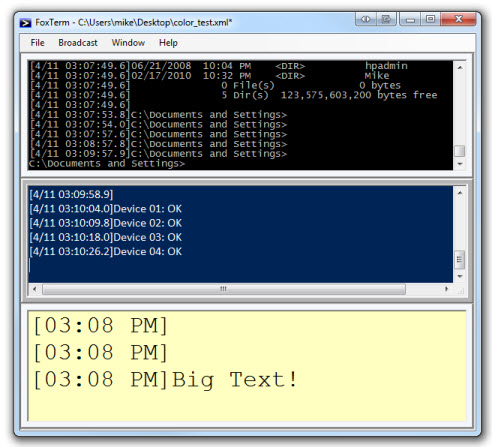
Sample screenshot using 1.3.3.0 font and window title options.
- Fixed an issue where custom COM aliases were being overwritten by the default alias when using the Properties right click menu option.
- Fixed an issue where parenthesis used in the SendLine() macro function would result in a syntax error. For instance SendLine("something (xyz)") would result an an error.
- Fixed an issue with carriage return processing.
- Fixed an issue with the binary display format converting any ASCII value over 0x7F to 0x3F. This issue was specific to COM ports.
- Improved FoxTerm startup time.
- Fixed an issue with final Xmodem transfer size not being displayed as the correct value.
- CTRL-X is now the Xmodem shortcut.
- Fixed a bug so that echo doesn't print ASCII text in raw format mode.
- Added the RecFlushInterval XML attribute, which stands for Receive Buffer Flush Interval. FoxTerm will now buffer the receive data for RecFlushInterval milliseconds before printing to the screen. This buffering allows FoxTerm to use less CPU cycles and also improves binary format appearance. The default value is 10ms. See sample_session.xml for more details.
- Now catch an exception that occurs if FoxTerm tries to open an XML session file that it does have access to.
- Fixed a bug introduced in 1.2.8.0 where changing the timestamp to "" would not take effect.
- Added ability to cancel out of an Xmodem file transfer by hitting CTRL-C.
- Added preliminary Xmodem 128-byte CRC-16 support for COM connections.
- Added a new binary format mode that displays both sent and received hex/ascii data. This option is under the "Formatting" menu item in the connection right click menu.
- Added the ability to bridge two connections. This is located in FoxTerm's main menu under "File->Advanced Options->Bridge Connections...". All data received on one connection will be forwarded to the second connection and vice versa. Useful for debugging.
- When creating new connections using the new connection dialog, the logic for the default alias has been improved. The default alias will be of the format XXX.XXX.XXX.XXX:PPPPP for telnet connections and COMXXX for COM port connections.
- Fixed an issue with the persistent size and location information used by FoxTerm. Under some conditions, FoxTerm's main window would get stuck minimized.
- Rearranged the connection right click menu. Instead of the "Setup" menu item at the top, there is now a "Properties" menu item at the bottom.
- Now using fixed width fonts in the broadcast dialogs for better readability.
- Added the ability to broadcast macro control. This allows you to specify a macro file and then run it on one or more connections at once.
- Added more detail to the broadcast logging dialog. It now displays what file is being logged to for the connections that are currently logging.
- Fixed a vertical scroll bar issue where after hitting enter, the connection window would not always scroll to the bottom most line.
- Added character echo for remote hosts that do not echo characters.
- Added newline control options. It is now possible to specify CRLF (\r\n) instead of LF (\n) for COM connections, and CRLF instead of Telnet newline (0x0D 0x00) for Telnet connections.
- Added Reconnect and Clear Screen options to the list of commands that can be broadcast to multiple connections at once.
- Added a link to www.foxterm.net in the help menu.
- New XML attributes in this release include newlineCtrl, lineWrap, and characterEcho. See sample_session.xml for details.
- Added a clear screen option to the connection right click menu.
- Fixed an issue where the right click menu would look as if a macro was running even if the macro was not executing due to a syntax error.
- Added CloseLog(), OpenLog(), and ClearScreen() functions to the macro support. See loop.ftm for examples.
- Added enable/disable line wrap to the connection right click menu.
- Fixed an issue where if the log file path included an invalid directory, FoxTerm would print an error message but the connection window title would still say "logging".
- Made a fix that only affects COM connections. There was a bug where both Telnet and COM connections were sending 0x0D 0x00 as the newline character. This was valid for Telnet but not for COM port connections. COM port connections now send '\n' for newline while Telnet still sends 0x0D 0x00.
- Fixed an issue where you could insert text anywhere in the text box instead of only at the end (this bug was introduced in 1.1.9.0).
- Added the log at startup feature to the New Connection COM/Telnet dialogs. Previously, this feature could only be enabled by modifying the XML session directly.
- The command that is sent every keep alive interval is now user-specified. The default command is a newline. See sample_session.xml for details.
- Added an Open File dialog to the New Connection COM/Telnet dialogs for specifying the startup macro and log file.
- Fixed an issue where after using up arrow history, backspace would not work.
- Fixed an issue where ANSI Escape Sequences for backspace and space keys were not processed correctly.
- Changed keep alive command from newline to Telnet nop (0xFF 0xF1).
- If there is text highlighted, we now automatically copy to clipboard if new text comes in. This is because processing new text unselects selected text.
- Fixed an issue where the version checking feature would sometimes use the version file from cache and falsely say there was a new version available.
- Fixed an issue where tiling the connections windows via the FoxTerm Window menu option was not maintaining window order correctly.
- Fixed an issue where the foxterm.dat file was not being save the the correct location. For instance, if you put FoxTerm in a directory, then made a shorcut, and put the shortcut in a different directory, the foxterm.dat file would be placed in the shortcut location instead of the foxterm.exe location. As a result, persistent info like window size, last session info, etc was not being loaded correctly.
- Fixed an issue where if keep alive tries to a ping a remote host after the connection goes down, no message was logged.
- FoxTerm will now notify you when there is a newer version available. It checks for new versions at startup.
- Added copy, paste, and reconnect to the right click connection menu.
- Filtered out additional unsupported ansi escape characters from being printed.
- Fixed an issue where the message saying logging has been stopped was using the wrong timestamp - it was using the timestamp from the previous log entry instead of using the time logging was actually stopped.
- Fixed an issue where once keep alive was started, it would not stop even after the user sets the keep alive value back to zero in the setup dialog.
- Fixed a bug with logAtStartup which caused the title not to indicate logging was occuring even though it was.
- Fixed an issue where auto log flushing wasn't always enabled. Auto log flushing flushes the log buffers every 10 seconds when logging is enabled to ensure the log files are always up to date.
- Fixed an issue where modifying connection settings from a setup dialog and then saving the session would clear the logAtStartup attribute.
- Added the logAtStartup connection XML attribute. Specify logAtStartup="true" to automatically begin logging on a particular connection when the FoxTerm session starts up. See the sample XML session for details.
- Made the broadcast command and logging command dialog settings persistent within a FoxTerm session. Useful when you need to bring up the broadcast dialog to send a particular command to the same 4 of 16 connections over and over again.
- Eliminated window flickering that could occur when restoring FoxTerm from the minimized state.
- The keep alive timer will now be reset when connection activity is detected.
- The connection terminal was automatically formatting URLs as links. This functionality has been disabled.
- The connection windows within FoxTerm will now stay in the order they are loaded in from the XML file. In previous versions, the last window that had focus would be reordered to the top left position.
- Fixed an issue where the CTRL-V paste operation was not working correctly.
- When a connection is open and logging, the logging state would became incorrect in the popup menu after clicking on the Setup... option. This has now been resolved.
- Corrected newline escape sequence - fixes a double prompt effect that occurs on some remote hosts
- Fixed an issue where the background macro thread wasn't getting paused when entering the setup dialog from the right click menu
- FoxTerm now prompts to see if the user would like to save the session if settings have been changed
- Added a keep alive feature for telnet connections. Allows the user to pick an interval in minutes to send a newline escape sequence to the remote host. Prevents the remote host from killing idle connections.
- Reorganized the connection dialogs and fixed tab stop bugs. Added tooltips to the connection dialogs.
- FoxTerm's maximize state is now persistent
- Fixed an issue where garbage characters would print to the screen when unsupported ANSI escape sequences were received from the remote host
- Fixed a lag issue timed from the point where a user would enter some text to the point where the text was echoed back from the remote host
- Improved Telnet error handling when connecting to dead remote hosts
- Added Telnet support
- Ctrl-A now works as expected
- Added a right click menu to connection windows. Allows easy navigation to connection setup properties, connect/disconnect, logging, macros, and close.
- Added a save option for the entire session. Ctrl-S saves the session.
- Added a new dialog to broadcast a command to one or more open connection windows
- Added basic scripting support. Support SendLine(), Sleep(), and while(1). See the startup.ftm and loop.ftm macros included in the zip file as an example.
- Added a tree control in the logging control so the user can start/stop logging on the connections they choose instead of all connections
- Added startup macro option so that the user can have a connection run a macro after the initial connection is made. This is useful for specifying login credentials. See the startupMacro attribute in sample_session.xml for details.
- FoxTerm is more like an actual emulator now. In previous version FoxTerm was attempting to manage client features like command history, buffering, etc. instead of sending one character at a time to the remote host and having the remove host echo them back. This led to a lot of corner case issues (password characters being echoed, etc). FoxTerm now provides more control to the remote host.
- Fixed a corner-case issue with timestamps showing up in the wrong locations in log files
- Added some help labels to the New Connection dialog
- Added a warning message if more than one 'COMPort' element was detected with the same 'Port' value. Duplicate XML elements is a common user error that can occur when copy and pasting XML.
- Fixed issues with left/right keys not working as expected
- Performance improvements for systems that are receiving a constant stream of data from one or more of the connections
- Fixed a hang issue that would occur when closing the app when a lot of data was being received
- Fixed an issue with the scolling mechanism jumping around everytime a key was pressed when horizontal scroll bars are present
- Logging is now stopped when session is closed
- Fixed issue with user-entered text and FoxTerm error prints being logged twice
- We now pick a default COM port instead of leaving the field blank in the New Connection dialog
- Removed 'test' menu option
- User input is now written to logs when logging
- Pasting will only paste plain text
- Fixed an issue where CTRL-C was printing a garbage character
- Logging - only the Start or Stop menu option is enabled at any given time
- Capped each window buffer to 80K characters to limit resource usage
|
|